刻む to carve rhythm
Turn a bar into a sequence of cuts, reverses, freezes, and grain. Paint the pattern. Let the track move through it.
Break the grid.
Keep the groove.
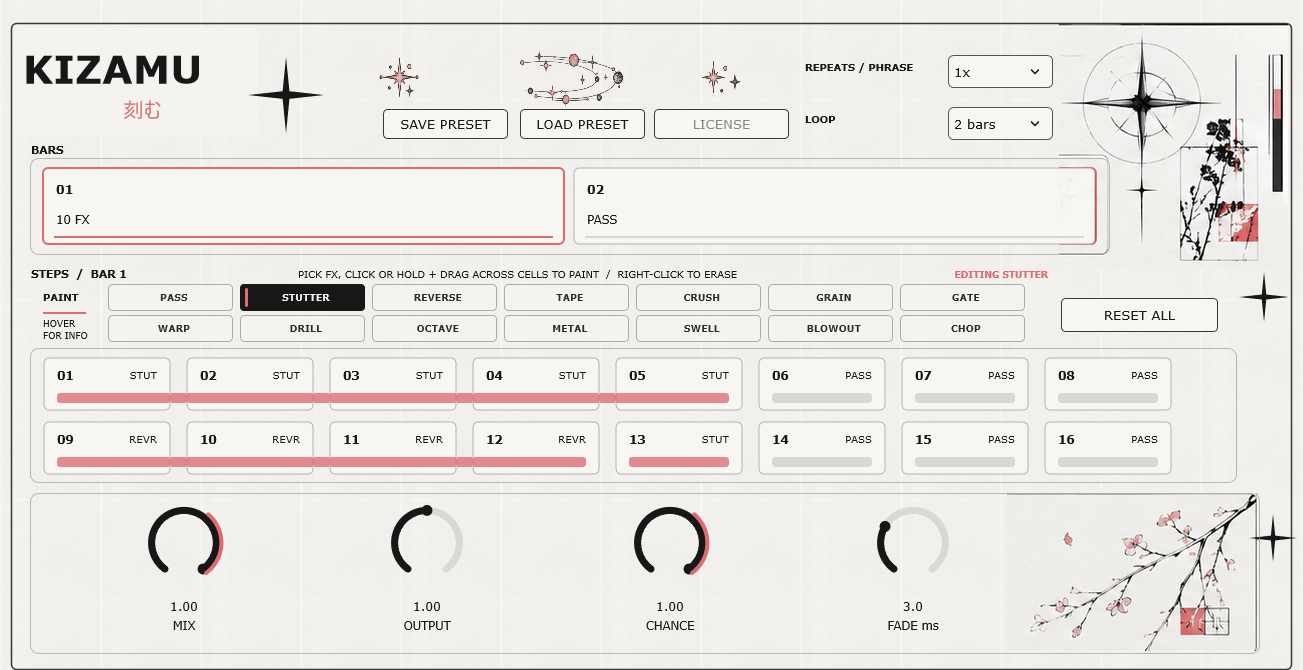
Work directly on an audio track. Choose a bar, select an effect, and paint it across the steps. Connected steps become a single phrase; the playhead follows your DAW transport.
Stutter
Repeat a captured phrase in time with your host.
↗Reverse
Play the preceding phrase backwards.
↗Tape
Slow the phrase like a tape stop.
↗Crush
Reduce bit depth and sample rate for harder edges.
↗Grain
Layer short grains and shape their pitch.
↗Half Time
Stretch the preceding audio at half speed.
↗Also includes Gate, Repeat, Octave Flip, Metal Freeze, Rev Swell, Blowout, and Stereo Chop.
One bar.
Sixteen steps.
Build a loop of 1, 2, 4, 8, or 16 bars. Edit each bar in a focused 16-step grid, then save the whole phrase as a preset or inside your DAW project.
Choose a sound
Each effect keeps its own controls.
Paint a phrase
Click or drag across steps to shape a longer gesture.
Play in sync
Start your host transport and hear the sequence follow the bar.
Make the cut.
A Windows x64 VST3 effect. Preset save and load. Project recall for your full sequence and controls.
- Hosted checkout and payment by Lemon Squeezy
- VST3 package and license key delivered after purchase
- Activate in the plugin; deactivate when moving computers